 Raftaar
Faster games.
Nothing you can't undo.
Raftaar tunes Windows for gaming with well-known, documented settings. It saves every value before changing it, so one click puts your PC back exactly as it was. And it measures your FPS instead of promising it.
If Windows shows "Windows protected your PC", click More info → Run anyway. · All versions
2.8 MB · No ads · Works offline · English, اردو, हिन्दी, العربية, Español, Português, Türkçe
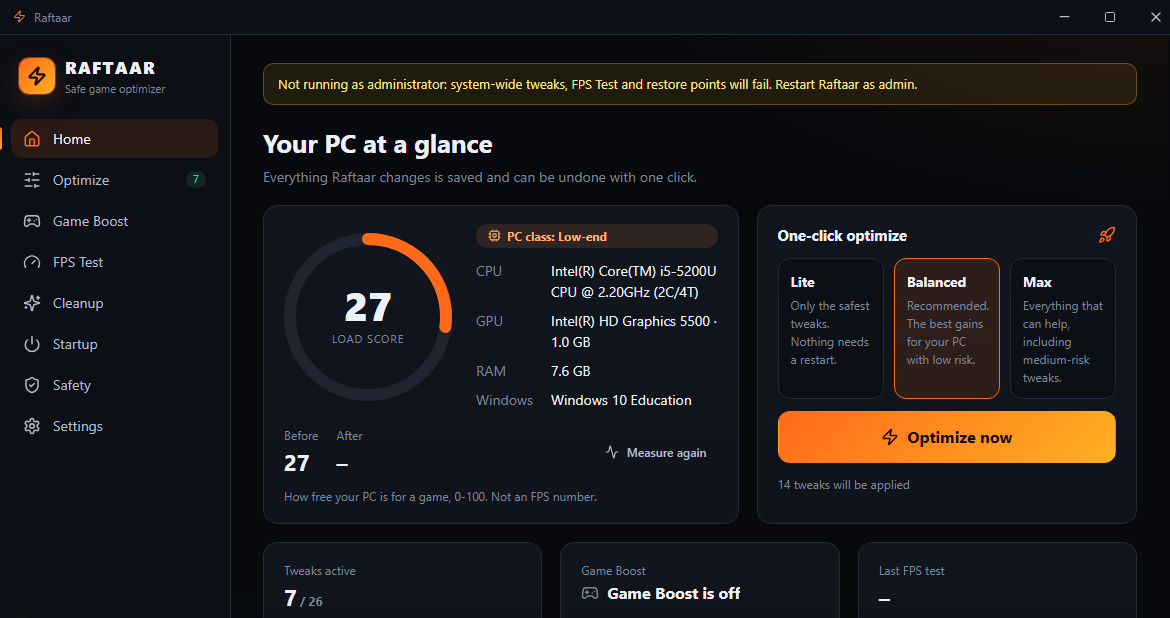
Everything a gaming PC needs
The useful parts of the big optimizers, without the parts that break Windows.
One-click optimize
26 tweaks in 7 groups (FPS & input lag, power, background apps, ads & tracking, visuals, network, storage), picked for your PC's class.
Real FPS Test
Records your game with Intel PresentMon and shows average FPS and 1% / 0.1% lows, before vs after. No made-up numbers.
Game Boost
Finds your Steam, Epic, Riot and Roblox games. While you play: high priority, a 1 ms timer, and Discord or Chrome closed, then reopened after.
Cleanup
Temp files, shader caches, crash dumps, error reports and browser caches, with sizes shown before anything is deleted.
Startup manager
See what starts with Windows and switch it off the same way Task Manager does. Fully reversible.
Live monitor
CPU, RAM and GPU load in real time, and which programs are eating your memory.
Built to be undone
Optimizers have a reputation for breaking Windows. Raftaar is designed the other way round.
What Raftaar does
- Creates a System Restore point before the first change
- Saves every original value before writing anything
- Revert one tweak, or everything, in one click
- Explains every tweak, its risk, and whether it needs a restart
- Shows a list of every active change and when it was made
What Raftaar never touches
- Windows Defender and your antivirus
- Windows Update
- UAC and the firewall
- Security mitigations (Spectre / Meltdown)
- Windows services and drivers
Simple pricing
The safe core is free forever. Premium starts with a 7-day free trial, no card needed.
Free
- All safe tweaks, Lite and Balanced presets
- Revert All, restore points, Safety center
- Cleanup, Startup manager, live monitor
- No ads, ever
Premium
- Game Boost
- FPS Test with Intel PresentMon
- 4 advanced tweaks (Max preset)
- Yearly: $19.99 · Rs 2,999
Pay by card worldwide, or JazzCash / Easypaisa in Pakistan. Buy from the Premium page inside the app.
Questions
Will Raftaar increase my FPS?
It depends on your PC. On machines with lots of background load the difference can be large; on a clean, powerful PC it can be small. That is why Raftaar includes an FPS Test: measure before, optimize, measure after, and see the real change.
Windows says "Windows protected your PC". Is it safe?
That SmartScreen message appears for new apps without a paid code-signing certificate yet. Click "More info", then "Run anyway". The source code is public on GitHub, and every update is cryptographically signed.
Why does it need administrator rights?
Some settings (power, game scheduling, restore points) live in system-wide parts of Windows. Raftaar only changes the settings listed in the app.
How do I undo everything?
Click "Revert all" in the sidebar. Raftaar puts back every value it saved. You can also use the restore point it created.
Does Raftaar collect my data?
No. It works offline. The only network request is checking GitHub for updates (and, for card licenses, checking the license).